
.gif)
.gif)

Stop starting from scratch every campaign
If you're responsible for putting together the next marketing campaign deck, chances are you already know the story you want to tell. The research is done. So why does turning all of that into a presentation still feel like starting from zero?
The challenge usually isn't strategy. It's organizing scattered ideas into a clear narrative, then rebuilding that process every time a new campaign launches. When deadlines are tight, that's where hours disappear.
The good news is that speed doesn't come from rushing. It comes from having a repeatable system. Pair a simple framework with AI, and you can go from idea to a polished campaign deck in 30 minutes or less without sacrificing clarity or strategy.
Work faster by starting with structure
Your campaign doesn't exist in one place. It's spread across brainstorms, research docs, customer interviews, Slack threads, and quick conversations. Pulling all of that into a presentation is often harder than the campaign itself. This is where structure can make a significant difference.
A reusable framework gives you somewhere to start and AI helps organize your thinking instead of leaving you with a blank slide. The combination is what saves time. Instead of rebuilding the same deck from scratch for every launch, you're refining a process that already works.
Start with the big picture, then drill down
Before you think about slides, think about the story.
A simple workflow keeps the process moving: define → structure → draft → refine.
Start by defining the campaign's goal, audience, and core message. Then organize those ideas into a logical narrative. Once the structure is in place, build a draft and fill in the supporting details. The final step is refinement, where you tighten the messaging, improve the visuals, and make sure every slide earns its place.
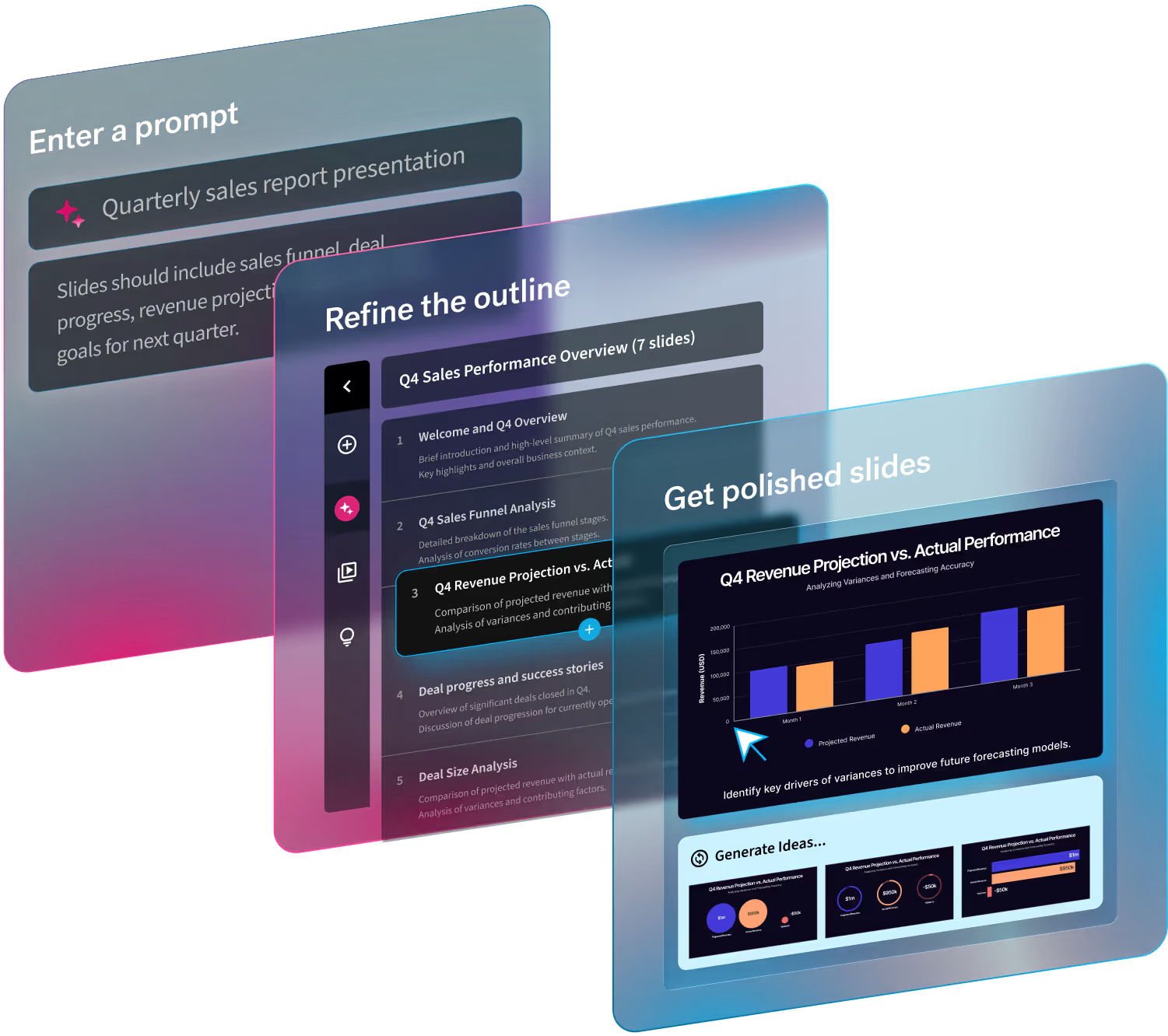
Beautiful.ai's Create with AI Workflow is built to support this process. Instead of starting with a blank deck, you can begin with a prompt, outline, or supporting documents to generate a structured first draft, then refine the presentation as your story takes shape. That keeps your attention on the campaign strategy instead of formatting slides.
Minutes 0–5: Define the campaign in one breath
Before you begin building slides, start by answering three questions:
- What business goal is this campaign trying to achieve?
- Who is it for?
- What's the one message you want people to remember?
If the answers already exist across briefs, research, or planning docs, AI can quickly pull them together into a working draft. The quality of that draft depends on the quality of your prompt, so be specific about the audience, outcome, and format you want. Even something as simple as asking for a one-sentence positioning statement gives you a focused starting point instead of a blank page.
This step also helps eliminate decision fatigue later. Once your direction is clear, the rest of the deck becomes much easier to build because every slide has a job to do.
Minutes 5–15: Let AI build the skeleton
Now that you've defined the campaign, it's time to build the framework.
Don’t start by opening a blank presentation. Let AI help organize your thinking into a logical narrative. Give the AI enough context to organize your thinking. Include your campaign goal, audience, messaging, supporting documents, and any existing research. The result should be an outline that's structured enough to edit.
A first draft might look something like this:
Campaign overview
Launch our spring product campaign to increase qualified demo requests by 20%.
Target audience
IT leaders at mid-sized companies looking to simplify team collaboration.
Core message
Reduce busywork so teams can spend more time on high-impact work.
Channels
LinkedIn, email nurture, paid search, webinars, and partner marketing.
Timeline
Four-week launch with weekly milestones and campaign checkpoints.
Success metrics
Demo requests, landing page conversion rate, pipeline influenced, and cost per qualified lead.
That's enough to start building. The wording won't be perfect, and it doesn't need to be. The goal is to replace the blank page and decision paralysis with a logical structure you can improve.
If you're using Beautiful.ai's Create with AI Workflow, you can generate that outline from a prompt, existing notes, or supporting documents before moving into slide creation. Starting with structure makes the rest of the deck much faster to refine.
Minutes 15–25: Fill in without overthinking
With the structure in place, start filling in each section using the materials you already have. Pull messaging from your campaign brief, performance data from previous launches, customer research, or brand documentation. AI can help summarize those sources and turn them into slide-ready content, but this is where your judgment is critical.
Resist the urge to explain everything. Campaign decks work best when they make one clear point per slide.
For example, AI might generate something like this:
Our comprehensive multi-channel strategy will leverage several integrated marketing initiatives to maximize audience engagement across every stage of the buyer journey.
A stronger version is simply:
Reach buyers where they're already making decisions.
The supporting bullets can explain how. The headline should communicate the takeaway immediately. That same principle applies throughout the deck. If a slide feels crowded, cut instead of adding more. Clear messaging is almost always more persuasive than comprehensive messaging.
Beautiful.ai helps here, too. Once your content is in place, Smart Slides automatically adjust layouts as you edit, so you can keep refining the message without spending time fixing spacing or formatting.
Minutes 25–30: Refine like an editor, not a writer
Now that the draft is finished it's time to make the deck presentable. Beautiful.ai makes this step faster by automatically keeping layouts balanced as content changes. That means you can keep refining the message without breaking the design.
This isn't about adding more content. At this step, subtraction will serve you better than addition. Focus on making the story easier to follow. Tighten headlines, remove anything that doesn't support the core message, and look for places where one chart or visual can replace a paragraph of text.
Take one last pass through the deck and ask yourself:
- Does every slide support the campaign goal?
- Is there one clear takeaway per slide?
- Could anything be removed without changing the story?
AI gets you most of the way there, but this final pass is where your expertise shows. You're the one who knows what your audience cares about, which details deserve attention, and what can be cut. Nothing replaces human judgement and nuance.
Cutting corners sacrifices time savings
The fastest way to waste time is to skip the steps that create clarity. If you jump straight into building slides without defining the campaign, you'll end up reorganizing the deck later. If you accept AI's first draft without reviewing it, you'll spend even more time fixing weak messaging or filling in missing context.
Use AI for the work it's great at: organizing information, creating outlines, summarizing research, and adapting content for different audiences. Then review every draft with the same care you'd give something written from scratch.
That review isn't just quality control. It also helps you guide AI toward stronger outputs as you iterate.
Before you move on, come back to the define step. Your campaign goal and core message should still be obvious by the final slide. If they aren't, you've probably added more than your audience needs.
Speed is enabled through systems, not sprints
The teams that build great campaign decks quickly aren't rushing. They've removed the friction before the work begins. They have a framework they trust, reuse successful structures, save prompts that work, and build on previous campaigns instead of starting over every launch.
AI makes those systems even more effective by speeding up the repetitive parts of the process, giving marketers more time to think about positioning, messaging, and execution.
Beautiful.ai supports that workflow from outline to final presentation. Whether you're starting with a prompt, an existing campaign brief, or a collection of planning documents, the platform helps you organize ideas, generate a polished first draft, and iterate without getting bogged down in slide design.
If you’re ready to spend less time formatting slides and more time building campaigns, try Beautiful.ai to turn your prompts, outlines, and campaign briefs into polished presentation drafts in minutes.

.avif)


.avif)
.gif)
