.gif)

Introduction: The Tool You’ve Always Used Might Be Holding You Back
PowerPoint has been a workplace staple for decades. It's familiar, widely supported, and capable of producing sophisticated presentations. But familiarity can make it easy to overlook the inefficiencies we've learned to work around.
Consider how much time your team spends creating presentations. How much of that time goes toward developing the actual message? And how much goes toward formatting slides, tracking down old content, or fixing someone else's edits?
The question isn't whether PowerPoint is still useful. It is. The question is whether your current presentation workflow is the most efficient way to communicate ideas.
With more presentation software options available, businesses have good reason to reconsider the default.
Key takeaways
- Familiar tools can carry hidden costs. Manual formatting, repeated revisions, and duplicated work consume time that rarely gets measured.
- Presentation efficiency is a business issue. Slow workflows affect productivity, brand consistency, and how quickly teams respond to opportunities.
- Modern presentation systems offer a different approach. AI-assisted creation, reusable content, and automated design can reduce the work required to produce and maintain professional presentations.
1. The legacy of traditional presentation tools
PowerPoint was introduced in 1987, long before cloud collaboration and generative AI became part of everyday work. Its original approach gave users control over individual slides, including text placement, layouts, and visual elements.
That flexibility is still useful, especially for highly customized presentations. PowerPoint has also evolved considerably, adding cloud collaboration, AI-assisted drafting, and design capabilities through Microsoft Copilot.
Still, much of the traditional presentation workflow depends on users making design decisions manually.
Today's businesses expect faster turnaround, more frequent updates, and consistent communication across departments. A tool can support those needs technically while still requiring more work than the process should demand.
2. Where the friction shows up
Most presentation inefficiencies are easy to dismiss individually.
A sales representative spends 20 minutes adjusting a pitch deck. A marketer rebuilds a chart from last quarter's report. An operations manager searches through old files for an approved company overview.
Teams repeatedly spend time on:
- Manual formatting: Resizing text boxes, aligning objects, and adjusting layouts after content changes.
- Duplicated work: Rebuilding slides that already exist somewhere in the organization.
- Content discovery: Searching for approved assets, current data, or the latest presentation version.
- Revisions: Coordinating edits and approvals across multiple contributors.
Even with modern collaboration features, these tasks can persist when teams lack shared standards and reusable content.
3. The 4 hidden cost to your business
Presentation software is usually evaluated by its subscription price. A more useful calculation includes the employee time and operational effort required to produce the finished work.
Time Cost
Time spent on presentations scales with the number of people creating them.
Consider a hypothetical team of 20 employees. If each creates two presentations monthly and spends just 45 minutes per deck on avoidable formatting or rework, that's 30 hours lost every month.
Across a year, those small inefficiencies total 360 hours.
The exact cost will vary by organization. The point is that repetitive work becomes expensive when multiplied across teams.
Productivity Cost
Every hour spent troubleshooting slide layouts is an hour unavailable for other responsibilities.
For sales teams, that's time away from prospecting or customers. For marketing, it competes with campaign development. For executives, it pulls attention from decisions that require their expertise.
These tradeoffs matter more than the time spent formatting any individual slide.
Consistency Cost
When employees build presentations independently, brand guidelines become open to interpretation.
Fonts change. Logos become outdated. Messaging gets copied from old decks.
The result can be a collection of presentations that look and sound like they came from different companies.
Correcting those inconsistencies creates additional review work for marketing and design teams.
Opportunity Cost
Sometimes the most expensive consequence of a slow presentation workflow is the delay it creates.
A proposal that takes two days to finalize might miss an opportunity for a timely customer follow-up. An executive update delayed by multiple review cycles can hold up a decision.
Those outcomes are difficult to assign a precise dollar value, but they deserve consideration when evaluating a business workflow.
4. Why teams stick with it anyway
If traditional presentation workflows create so much friction, why haven't more organizations changed them?
PowerPoint is deeply integrated into business operations. Employees know how to use it, existing presentations are stored in its format, and external stakeholders frequently expect PowerPoint files.
Replacing an established tool introduces legitimate concerns about retraining, compatibility, and disruption.
There's also the familiar argument that the current process works well enough.
But "good enough" becomes harder to defend as presentation volume increases. A workflow that feels manageable for five employees may become cumbersome across 50.
The cost of switching is visible. The cost of staying with an inefficient process often isn't.
5. What modern teams need instead
Modern presentation software should reduce the effort required to create, update, and share professional work.
That means prioritizing capabilities that address recurring problems:
Automated design. Layouts should adjust as content changes, minimizing the need to manually resize or reposition elements.
Reusable presentation assets. Teams should have access to approved slides, presentation templates, and brand assets without rebuilding them.
Consistent branding. Shared themes and brand controls should make it easier to maintain approved fonts, colors, and logos.
Connected collaboration. Contributors need a shared workspace where feedback, edits, and current versions are easy to manage.
Beautiful.ai approaches these needs through Smart Slide layouts that automatically adjust formatting as content changes. Teams can also use shared resources and brand controls to standardize how presentations are created.
6. The shift from tools to systems
There's a difference between giving employees presentation software and establishing a presentation system.
Software helps someone create a deck. A system determines how presentations are built, maintained, and reused across an organization.
Consider a company with 100 sales representatives. Each needs approved product messaging, pricing information, and brand assets.
If everyone maintains their own version of that content, changes become difficult to manage. When the product changes, multiple presentations may need updating.
Beautiful.ai's team features allow organizations to maintain approved presentation templates, shared assets, and reusable slides. Certain shared slides can remain locked, with centralized updates pushed to presentations that use them.
That gives employees room to tailor their presentations while preserving information that needs to remain consistent.
For growing businesses, this is where presentation software begins to function as operational infrastructure.
7. Where AI changes the equation
AI has made the first draft of a presentation considerably easier to produce.
Modern AI presentation makers can turn prompts, outlines, and supporting documents into slide content. They can also help rewrite text, organize information, and explore different visual approaches.
But generating slides quickly doesn't automatically mean a presentation is finished faster. Poor structure, generic messaging, and inaccurate content can create additional editing work.
The more useful application of AI is reducing work throughout the creation process.
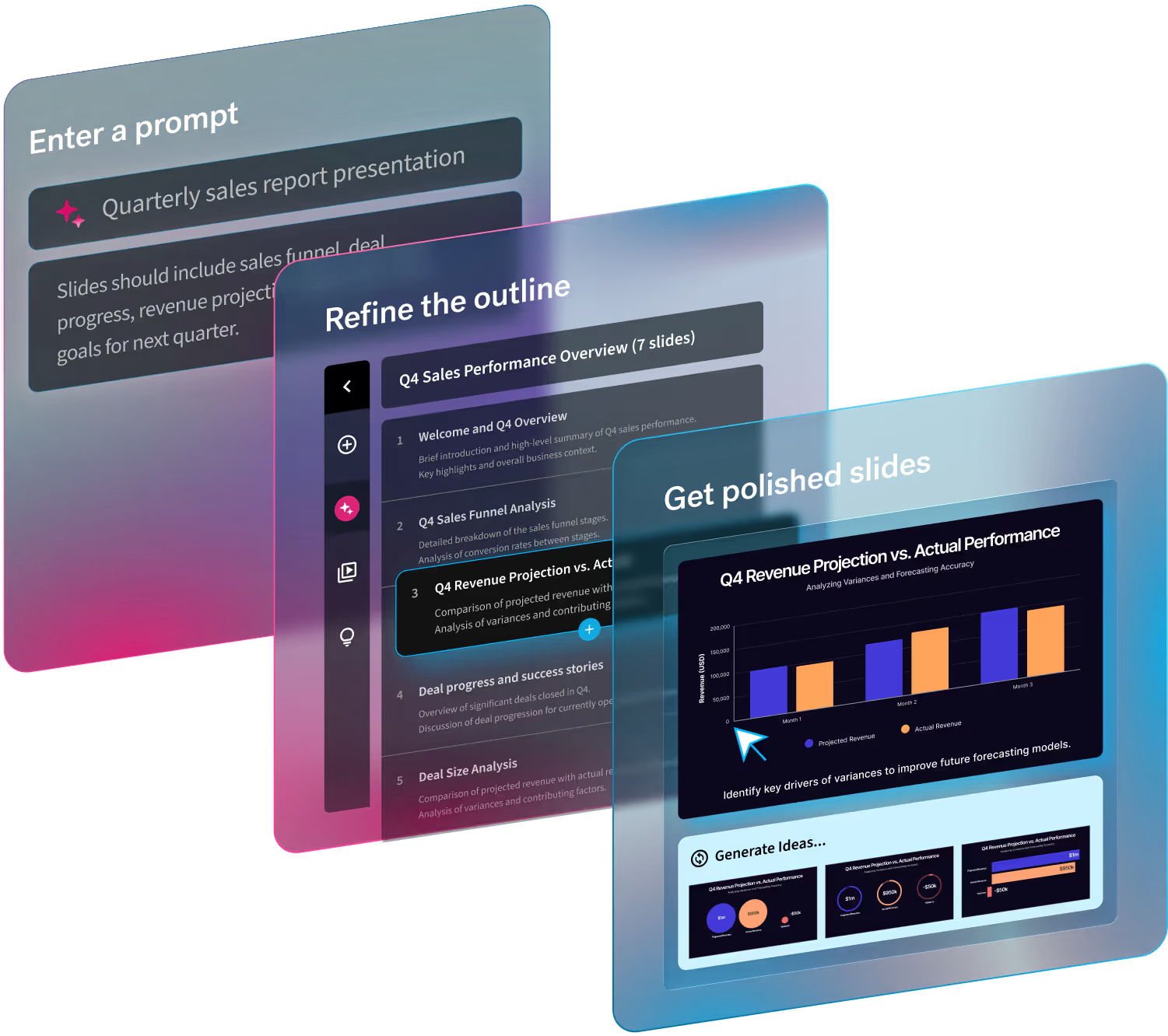
Beautiful.ai's Create with AI Workflow, for example, adapts to the user's starting point. Someone with a broad topic can provide more direction before generation. Someone with an existing outline can move more directly into building slides.
Once generated, Smart Slides handle much of the formatting, while users retain control over individual slides and messaging.
AI handles the initial production work. Human judgment determines what is accurate, relevant, and worth presenting.
8. When it’s time to rethink your stack
How do you know when your presentation workflow needs attention?
Start by looking for recurring problems.
Are employees rebuilding similar presentations every month? Does marketing regularly fix other departments' slides? Do minor content changes trigger extensive formatting work? Are teams struggling to locate approved content?
These are signs that the current process may be costing more than expected.
Growth can make these problems more visible. As organizations expand into new regions, add sales representatives, or increase reporting requirements, presentation volume rises.
A process that depends on individual effort becomes harder to sustain.
Before investing in another tool, measure where time is being spent and identify which tasks could be standardized or automated.
9. Making the transition practical
Moving beyond traditional presentation workflows doesn't require an overnight replacement of PowerPoint.
A more practical approach is to test a modern system against a repeatable business task.
Start with one use case. Choose a presentation your team creates frequently, such as a sales pitch, monthly performance report, or quarterly business review.
Establish a baseline. Measure how long the current process takes, including drafting, formatting, revisions, and approvals.
Run a controlled comparison. Create the same type of presentation using a modern platform. Evaluate the finished quality, total production time, and ease of updating the deck.
Standardize what works. Build reusable presentation templates, establish brand controls, and make approved content accessible to the team.
The goal is measurable improvement, rather than introducing new software for its own sake.
Compatibility should also be part of the evaluation. Beautiful.ai supports editable PowerPoint exports on eligible plans, allowing teams to create presentations in a modern environment while continuing to deliver PPTX files when necessary. Certain elements, including animations and audio, do not carry over to PowerPoint exports.
A successful transition should fit existing business requirements while removing unnecessary steps from the process.
Conclusion: Don’t Let Legacy Tools Define Modern Work
PowerPoint isn't going away, and it doesn't need to.
For some organizations and use cases, it will remain the right choice. But relying on it simply because it's familiar can prevent teams from recognizing the time and effort their existing workflows require.
Businesses regularly review their technology investments for efficiency. Presentation creation deserves that same scrutiny.
Modern platforms like Beautiful.ai offer a practical way to test a different approach, combining AI-assisted drafting with automated design and reusable presentation resources.
Start with a recurring deck, explore professionally designed presentation templates, and measure what changes.
The question worth asking is simple: If your team were designing its presentation workflow today, would it choose the one it's currently using?
Do you want a more modern presentation experience? Give us a try!